 Srikanth Badavath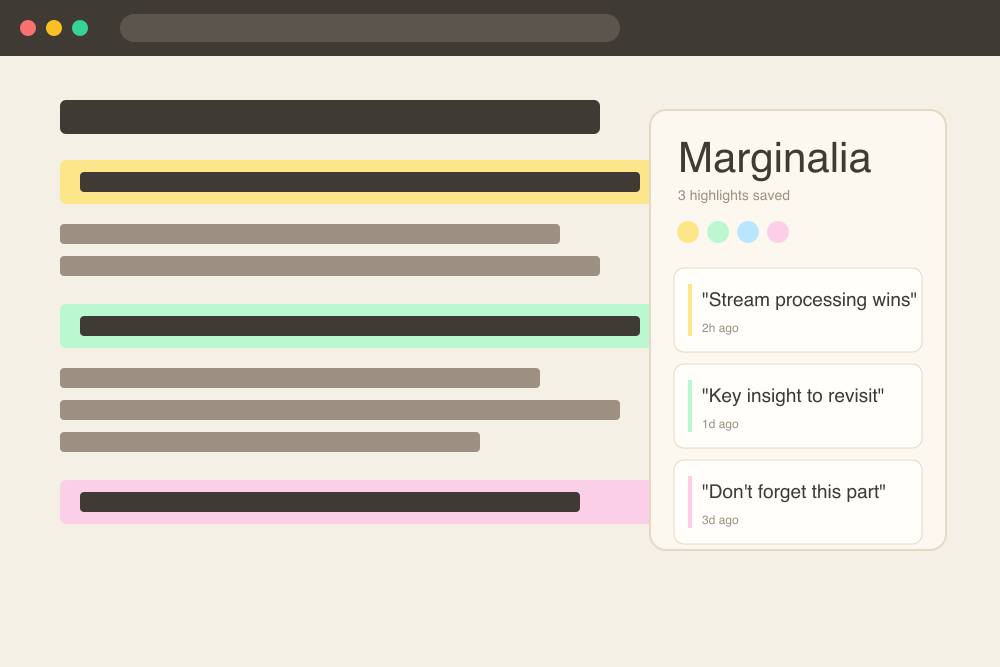
Why Reading Online Is Broken
You read something fascinating. A paragraph in an arXiv paper, a key insight buried in a blog post, a line from a Wikipedia article that reframes everything. You don't highlight it. You tell yourself you'll remember it. Two days later it's gone — completely gone — not just the words but the entire thread of thought that came with it.
This is not a willpower problem. This is an environment problem. Physical books have margins. You can scrawl a "!!!" next to a sentence, draw an arrow, underline, dog-ear the page. Those physical traces become a second layer of thought that lives alongside the original text. The web has no margin. You read, and then you leave, and the page forgets you were ever there.
Here's what that forgetting looks like in practice:
That fading middle line is the one that mattered most to you. Gone by Tuesday. The web keeps no record of what caught your eye. Marginalia fixes that.
What Is Marginalia
Marginalia is a Chrome extension that brings the margin back to the web. It lets you highlight any text on any webpage, attach a private note to that highlight, assign it a colour category, and then search across every highlight you've ever made — from any site, any time.
The name comes from the Latin word for "margin notes" — the annotations scholars wrote in the blank space beside printed text for centuries. Marginalia does exactly that, except the margin is invisible until you need it, and it follows you across the entire web.
How to Use Marginalia
Step 1: Select & Highlight
Select any text on any webpage, right-click or open the extension popup, and choose a colour. The highlight persists — it will still be there the next time you visit that URL.
We propose a new simple network architecture, the Transformer, based solely on attention mechanisms, dispensing with recurrence and convolutions entirely.
The dominant sequence transduction models are based on complex recurrent or convolutional neural networks that include an encoder and a decoder. Results on two machine translation tasks show these models to be superior in quality.
Step 2: Add a Margin Note
Click any highlighted passage and a note panel slides in. Type your thought — a question, a connection to something else you read, a quick summary. The note is saved alongside the highlight instantly.
"dispensing with recurrence and convolutions entirely"
Step 3: Search Your Highlights
Open the Marginalia popup from any tab and search across every highlight you've ever made, on every site. The search is instant and runs entirely locally — no server, no index, no latency.
Step 4: Export Everything
Open the Marginalia popup, hit Export, and choose Markdown or CSV. Your data comes out clean and portable. Nothing is locked in. If you stop using Marginalia tomorrow, your highlights are still yours as a flat file you can open in any text editor.
Features Deep Dive
Colour Tags
Five colours, five mental categories. Assign meaning however you like — yellow for key facts, green for action items, blue for things to research further, pink for quotes worth keeping, purple for ideas.
Works Everywhere
Any website, any URL — Wikipedia, Medium, arXiv, Hacker News, news sites, GitHub READMEs, documentation pages. Marginalia injects into the page using a Shadow DOM so it never interferes with the host site's styles or scripts. It just works.
Privacy First
Every single highlight and note is stored locally in Chrome's chrome.storage.local API. Nothing is transmitted to any server. There is no Marginalia cloud. There is no account. There is no analytics on your reading. Your annotations belong to you and exist only on your machine. Read the full privacy policy →
Full-Text Search
The search in the Marginalia popup runs against both the highlighted text and your notes, across all URLs. If you highlighted "attention mechanism" on arXiv six months ago and added a note about Bahdanau, both terms will surface that result. It's grep for your reading history.
Export as Markdown or CSV
The exported Markdown looks like this — clean, human-readable, and ready to paste into Obsidian, Notion, or any plain text system you use:
## arxiv.org/abs/1706.03762
*Attention Is All You Need — Vaswani et al.*
### Highlight
> "dispensing with recurrence and convolutions entirely"
**Colour:** yellow
**Note:** This is the key architectural shift. Compare with Bahdanau 2014.
**Date:** 2026-06-15
---
Why I Built It
I was doing a lot of reading for my ML research at Virginia Tech — papers, lecture notes, blog posts, documentation — and I had a frustrating problem. My highlights were scattered everywhere. Some lived in Pocket, some in Notion, some were browser bookmarks, some were screenshots I told myself I'd organise later. Every system I tried had the same flaw: the highlight was divorced from the context where I encountered it.
A Notion page with a pasted quote doesn't tell you what came before it on the original page. A screenshot loses its text. A bookmark tells you where something is, not what caught your eye. What I really wanted was to be able to revisit a webpage and see my past self's reaction to it, layered on top of the original text, exactly where the original text was.
That's what Marginalia does. It's as close to writing in the margin of a physical book as I could get in a browser. When I visit a paper I highlighted two months ago, my underlines and notes are still there, exactly where I left them, and I can pick up the thread of thought exactly where I dropped it.
During the beta I shared it with a few people, including Dr. Vinod at NTU Singapore, who gave me feedback that made the whole project feel worth it:
That's exactly the target. I didn't want to build a productivity tool with a dashboard and gamification and badges. I wanted something that feels invisible until you need it — like a pencil next to a book.
Tech Stack
Building a Chrome extension has gotten significantly more complex with Manifest V3 — the new extension standard that Chrome enforces. I made careful choices about the stack to keep the developer experience sane.
chrome.storage.local gives you a simple key-value store that's scoped to your extension, persists across browser restarts, and is completely isolated from websites. It's the right tool for storing highlights locally — no IndexedDB overhead, no cookies, no localStorage namespace collisions.Install Marginalia
Marginalia is free and available right now on the Chrome Web Store:
What's Next
Marginalia v1 is deliberately minimal. I wanted to ship something that does one thing extremely well before adding features. But there are a few things I'm actively thinking about for the next version:
If any of these sound useful to you — or if you have a feature request I haven't thought of — the best place to raise it is the GitHub repo. I read every issue.
Try Marginalia — It's Free
If you read a lot on the web and you've ever wished you could just write in the margin, this was built for you. No account. No cloud. No subscription. Just your highlights, living in your browser, exactly where you need them.
Add to Chrome — Free